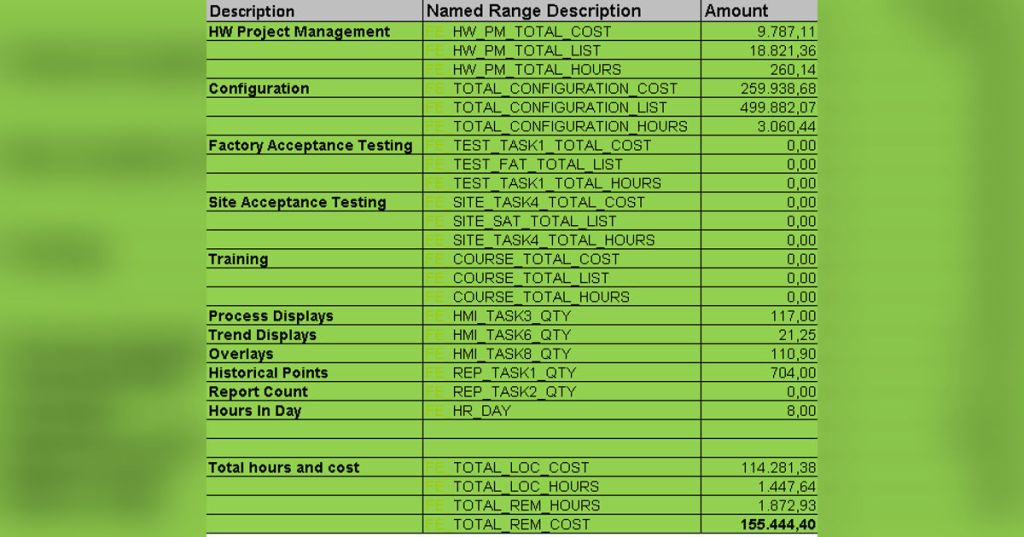
The Tool Converts Specifications and sequence/start‑up loops counts and I/O counts into engineering hours using nested IF statements. The key mechanisms are:
1 Dynamic I/O estimation logic
Input vs estimate fallback: Each quantity cell checks whether the user entered a quantity (e.g. SYS_WORKSTATIONS_QTY, CAB_IO_QTY). If the input is blank, the formula falls back to a default estimate (e.g. SYS_WORKSTATIONS_EST). For example, the quantity formula for the “Project Functional Specification” task multiplies the number of workstations, controllers, FBM modules and FDSI units by predetermined factors and adds extra terms for HMI and report tasks. This pattern is repeated across tasks – if an override is active (*_OVD_STS), the override quantity is used.
Aggregated I/O counts: Named ranges such as CP_TOT_IO, DI_TOT_IO, ESD_TOT_IO, CP_TOT_LOOPS and DI_TOT_LOOPS represent total analog/digital I/O for control and safety systems. These totals are defined on the Data Entry sheet and flow into Price Make‑up via named ranges. Tasks that depend on I/O multiply these totals by coefficients. For example, the Quality Assurance task uses =DOC_QA_REQ*(CP_TOT_IO+DI_TOT_IO+ESD_TOT_IO)/40, converting total I/O to hours using the QA requirement. Similar formulas transform total loops into hours for HMI reports and programming.
Platform‑specific logic (DCS, SIS, PLC): For panel, console or cabinet design tasks the formula multiplies quantities of Control Processor (CP), Device Interface (DI) and emergency shutdown devices (ESD) by different hour multipliers. The sheet also calculates group‑start loops and sequential loops, adding complexity factors and ESD programming requirements. These rules implement the DCS/SIS/PLC I/O‑to‑hours transformation.
Dynamic duplication: Summary lines like “Duplicate” and “Total” multiply the first‑unit hours by duplication factors such as DUP_FACT_APP_BASED_SPEC. When NO_OF_UNITS > 1, additional units receive a fraction of the first‑unit hours. This logic supports multi‑unit projects.
2 Role‑ and region‑specific cost calculation
Role‑based hour allocation: Columns CL–CP compute the share of a task’s hours that belong to different engineering roles: project management (PM), application Consultant AC), Lead engineering (LE), application engineering (AE) and Technician (T). Each column sums percentages from sub‑columns representing review, design, coding, testing and documentation (e.g. CL4 = SUM (AX4, BF4, BN4, BV4, CD4)). The percentages are defined by named ranges such as PM_PCT_REVIEW, AC_PCT_DESIGN etc. Multiplying the total hours (N4) by these percentages gives role‑specific hours (O4–S4).
Local vs remote hours: Named ranges like SPEC_TASK1_LOC_PCT and SPEC_TASK1_REM_PCT split hours between local and remote engineering. X4 calculates the local cost by multiplying local hours by the local cost rates (ACCH, LECH, AECH, TCH, SECH, SRCH). AJ4 calculates the cost of the remote portion by multiplying remote hours by remote rates looked up in the World Cost tables; it uses OFFSET and MATCH to find rates for the chosen remote country. The final cost L4 adds the local cost and the remote cost converted back to the local currency using currency conversion tables. Similar formulas are used for every task.
Region‑specific multipliers: The workbook stores cost rates per role and per country in the World Cost tables sheet. Named ranges like ACCH (Application Consultant Cost Hour), AECH (Application Engineer cost hour), etc. are retrieved via OFFSET functions referencing the selected local country. Remote rates are taken from the same table but offset by a column containing remote multipliers. Currency conversions use the CURRENCY_LOC_TABLE and CURRENCY_REM_TABLE to convert remote costs into the local currency.
3 Automated risk/variant‑based cost scenario simulation
Risk allowances: The Travel & Living section (rows 260–266) calculates allowances for factory acceptance tests and site work. For example, the “FAT “and Remote engineering allowance” formula checks if the remote country is in a high‑risk list and then multiplies default day/pers/trip values by country‑specific allowance factors and currency conversion offsets. Similar formulas handle site services (TL_TASK6) and high‑risk site services (TL_TASK7). If the site is not high‑risk, the allowance is zero. These rules simulate different cost scenarios based on country risk profiles.
Override logic: Most tasks have an override quantity (*_OVD_QTY) and an override status flag (*_OVD_STS). If the flag is true and justification is provided, the override quantity replaces the calculated quantity/hours; otherwise the base formula is used. This allows user‑driven what‑if scenarios without modifying the underlying formulas.
Multiple units and duplication factors: The duplication factors (e.g. DUP_FACT_APP_BASED_SPEC) allow the model to simulate economies of scale. When multiple units are specified, duplicate units use reduced hours and costs.
4 Modular structure for engineering activities
The Tool is organized by tracking activity ID (column A) and task number (column B). Major modules correspond to engineering disciplines:
0010 Specifications – tasks for requirement specifications, FAT/SAT procedures, quality assurance plans, etc.; formulas combine I/O totals and equipment counts to estimate hours.
0020 System Engineering – panel/console design, network configuration and other system‑level tasks. The design formula sums the number of panels, I/O modules and miscellaneous cabinets and multiplies them by role‑based hour factors.
Design / I/O Engineering – further sections (not shown in the snippet) compute loop diagrams, wiring diagrams, termination, etc., using CP_TOT_IO, DI_TOT_IO and complexity factors.
Implementation / Programming – sections convert loop counts to logic programming hours; ESD programming includes a 15 % complexity uplift when the system is redundant.
Testing – pre‑FAT, FAT, SAT and unit tests; formulas use total loops and report percentage factors to calculate test hours.
Documentation – BOM, loop and cabinet drawings, QA documentation; formulas multiply I/O and cabinet counts by drawing‑time factors.
Travel & Living and Allowances – calculates T&L costs and allowances for different scenarios.
Each module contains “1st Unit”, “Duplicate” and “Total” summary rows to aggregate hours and cost across units and to apply duplication factors. Named ranges such as APP_BASED_1st_UNIT_CP_HOURS or APP_BASED_TOTAL_SPEC_COST make these totals available to other sheets.
5 Export logic (XML generator)
Named‑range mapping: The Tool defines thousands of named ranges (e.g. APP_BASED_TOTAL_LOC_AC_SPEC_HOURS, APP_BASED_1st_UNIT_DESIGN_CP_COST, etc.). These names reference specific cells in the sheet and represent total hours and cost per role, per activity and per unit.
ERP export sheet: The ExportToERP sheet uses these named ranges to build a tabular structure for ERP/XML export. For each tracking activity ID and role (PM, AC, LE, AE, SE, SR), it populates columns for local hours, remote hours, total cost and currency. The formulas refer to APP_BASED_TOTAL_LOC_AE_SPEC_HOURS, APP_BASED_TOTAL_REM_AE_SPEC_HOURS, APP_BASED_TOTAL_SPEC_COST etc. The sheet also duplicates the lines for different brands (e.g. DCS and I/A).
XML generator macro: While the VBA code is not visible here, the workbook includes a macro (in vbaProject.bin) that iterates over the ExportToERP sheet and writes each row to an XML structure. The structured naming convention (Tracking Activity Id, Activity Type, Local Hours, Remote Hours, Cost, Currency) matches typical ERP import requirements.
6 Custom formulas and logical trees
The formulas in Tool are deeply nested and rule‑based. Patterns include:
IF(ISBLANK(input), estimate, input) to handle missing quantities.
Multiplying counts by constants (minutes per loop, hours per workstation, etc.) and dividing by 60 to convert minutes to hours.
IF(override_flag, override_qty, calculated_qty) to allow manual overrides.
MATCH/OFFSET to look up cost rates or currency conversions.
ROUNDUP and ^ functions to adjust hours for redundancy and complexity (e.g. ESD programming uses ESD_TOT_IO_CALC/30*(complexity*5+1)*1.15 when redundant).
These logical trees encode the estimation rules and allow the sheet to respond automatically to changes in quantities, complexity and regional selections.
7 I/O‑to‑hours transformation (DCS, SIS, PLC)
The conversion from I/O counts to engineering hours is scattered throughout the sheet and driven by named ranges:
Control Processor (DCS/PLC): Panel design hours sum the number of processors, I/O modules, marshalling terminals and consoles, each multiplied by a specific hour factor.
Digital input/output (SIS/ESD): ESD programming tasks use ESD_TOT_IO_CALC/30 multiplied by complexity terms and redundancy multipliers. Sequential loops and group start loops have separate formulas, each multiplying the number of loops by user‑defined complexity factors and base hours.
Testing: Test tasks convert total loops into test hours using coefficients; e.g. DOC_QA_REQ*(CP_TOT_IO+DI_TOT_IO+ESD_TOT_IO)/40 and other formulas scale test preparation hours by loop counts.
These formulas implement the DCS/SIS/PLC I/O‑to‑hours logic in a rules‑based manner.
8 Rate‑adjusted cost modelling with multipliers
Cost modelling is done by multiplying hours by role‑specific rates and then adjusting for location and currency:
Role rates: The World Cost tables sheet holds cost per hour by role (ACCH, AECH, LECH, TCH, SECH, SRCH) for the selected local country.
List vs actual factors: List rates (ACLH, AELH, etc.) are derived from cost rates divided by a FACTOR_LIST constant to obtain list prices.
Location multipliers: Remote work rates are taken from the same table but offset to columns representing the chosen remote country; these multipliers account for wage differences. Currency conversion uses CURRENCY_LOC_TABLE and CURRENCY_REM_TABLE to translate remote cost into the local currency.
Percentage multipliers: The sheet multiplies the role‑based hours by LOC_PCT and REM_PCT to allocate cost between local and remote engineering. Additional multipliers (PM percentage, escalation factors, duplication factors) adjust costs for project management effort and escalation.
9 Data flow to other sheets and modules
Input data: Quantities, system configuration parameters, I/O counts, complexity factors and override flags originate from the Data Entry, Application Based, Task Based and Assumptions – Proposal infos sheets. Named ranges such as SYS_WORKSTATIONS_QTY, CP_TOT_IO and HIGH_RISK_SITE make these values visible in the Tool.
Outputs: GECE Tool defines thousands of named ranges representing hours and cost per role, per activity and per unit. These names are consumed by:
Unit Pricing Calculations – uses APP_BASED_TOTAL_SPEC_COST, TASK_BASED_TOTAL_COST, etc. to calculate unit prices and escalation factors.
Proposal Summary – reads total hours and cost to build summary tables for proposals.
GECE TO CQA Output – summarises local vs remote hours and cost for internal reporting.
ExportToERP – maps each tracking activity and role to ERP fields for XML export.
Macros in the VBA project create the XML file and may also copy summary data to other systems.
Summary
The Tool is the central calculation engine of the GECE tool. It translates project inputs (quantities, I/O counts, complexity factors and risk settings) into hours and cost across multiple engineering roles and locations using rule‑based formulas. The sheet’s modular layout and extensive use of named ranges allow it to support dynamic estimation, risk‑adjusted scenarios and regional cost modelling, but the complexity and reliance on volatile functions introduce maintenance and performance risks.
 GECE
GECE 
Leave a comment